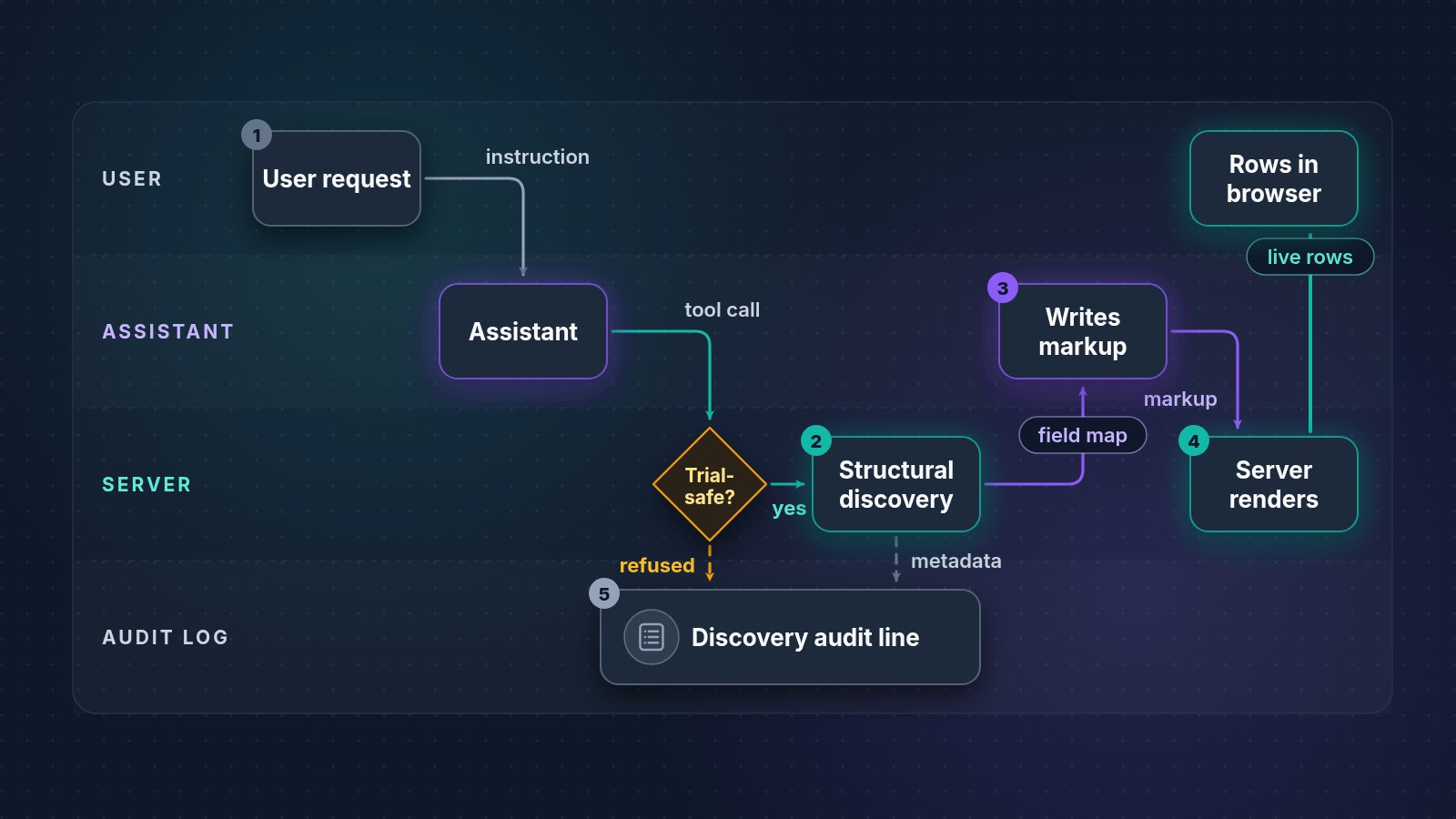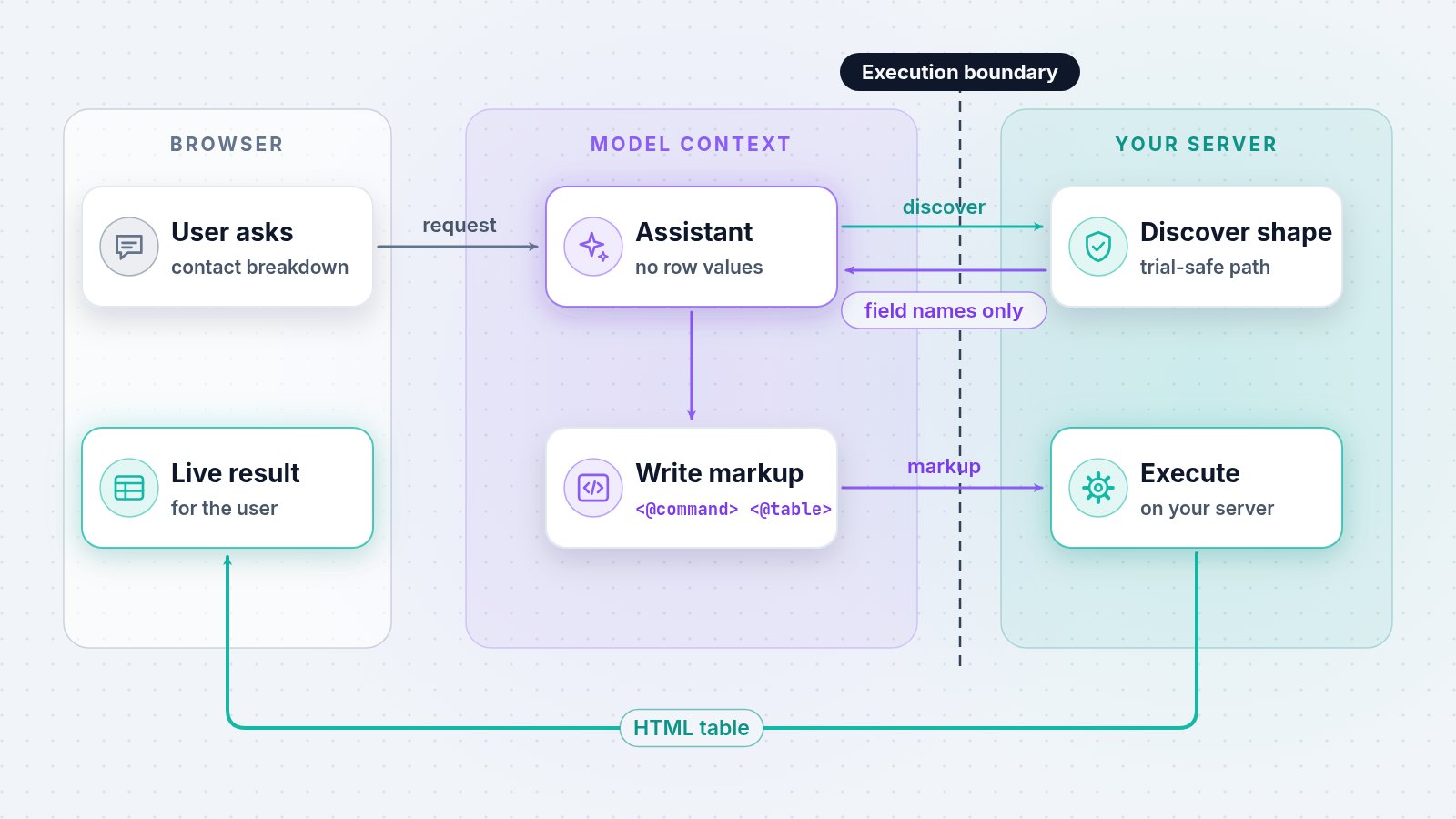
Markup-first reduces exposure because the model can describe a screen without receiving the records that screen will display. WebEdify, MACRIM's .NET application platform, gives the assistant structural information it can use to author tags and locators; the server then executes that markup under the application's configured controls and sends the rendered result to the authorized user's browser.
That split is architectural, not a policy checkbox added after the fact. The full tier model lives on Why WebEdify — AI data access; this article explains why markup-first beats database-first for regulated and operational data.
Why can the model build a screen without row values?
Tables, charts, and forms need a shape before they need data. A table definition needs column names and locators. A chart needs category and measure fields. A form needs field names, types, and validation rules. None of those tasks requires customer names, invoice totals, or diagnosis codes in the prompt.
WebEdify's discovery path supplies node paths, attribute names, hierarchy, and child counts with values stripped. That is enough to select accurate tags, columns, and locators before the server loads the result for the authorized user.
Why is writing markup safer than reading rows?
Three mechanisms work together.
Minimized exposure surface. Structure discovery answers "what fields exist and where do they live?" without putting business values into model context. A narrower input creates fewer opportunities for sensitive or irrelevant records to cross the model boundary.
Server-side execution boundary. When the assistant produces markup, execution happens on your infrastructure:
<@command name="list-contacts" group="default" rename="rows" />
<@table source="rows" mode="server">
  <@column prop="name" title="Name" />
  <@column prop="email" title="Email" />
</@table>
The command runs in your segment under the command roles, permission overlays, and ownership rules your application declares. The HTML table travels from your server to the user's browser. The model received angle brackets and attribute names — not the returned email values.
Reviewable artifacts. Markup is text in source control. A developer or compliance reviewer can inspect the proposed commands, columns, filters, and locators before promotion instead of reconstructing intent from a conversation built around pasted query results.
The model does not become less capable because values stay behind the execution boundary. It still has the information required to compose the screen; WebEdify supplies the live values only when the application executes that composition for the user.
How does the execution boundary work in practice?
A typical markup-first interaction follows a short sequence:
- A user asks for a contact breakdown by status.
- The assistant discovers the available result shape through a trial-safe command path.
- It writes a
<@command>plus<@table>or<@chart>using the discovered fields. - WebEdify executes the artifact and renders the live result for the user.
For a clinician-facing dashboard, this pattern lets the AI help build a view without requiring patient identifiers in model context. The same design target applies to finance, HR, and membership data.
When a task truly requires the model to reason over values, that is a separate data-sharing decision. The canonical AI data-access explanation documents those paths; they are not a hidden side effect of asking the assistant to build markup.
Why does declarative markup help the model stay safe?
Imperative code encourages the model to invent queries, paste results, and improvise joins in chat. Declarative WebEdify tags constrain the output space: valid pages compose from <@command>, <@table>, <@chart>, <@form>, and documented attributes. Prompts can require "discover structure, then show markup" as an enforced sequence.
Trial-safe processor gating adds an execution boundary: discovery refuses processor paths that are not classified as safe for trial execution. That keeps screen discovery separate from save, delete, send, arbitrary code, and other mutating behavior.
That pairing — constrained syntax plus gated discovery — produces reviewable application files instead of one-off scripts assembled around pasted data.
What should you ask any vendor claiming "AI privacy"?
- Does the default mode send row values to the model, or can it discover structure separately?
- Can the user receive a rendered result without making result rows part of model context?
- Can you inspect the artifact the model produced before it is promoted?
- Which operations are eligible for discovery, and which are refused?
WebEdify's markup-first answer is concrete: discover the shape, author a bounded artifact, execute it on the server, and render it for the user. For the complete data-sharing model and broader controls, use the canonical answer on Why WebEdify.
How can you verify the AI boundary?
If AI-assisted reporting or dashboard authoring is on your roadmap, pilot the workspace against a non-production segment. Watch one request end to end: inspect the discovered structure, review the authored markup, and compare both with the rendered panel. That exercise tests the architectural boundary this article describes without substituting a marketing claim for your own security review.