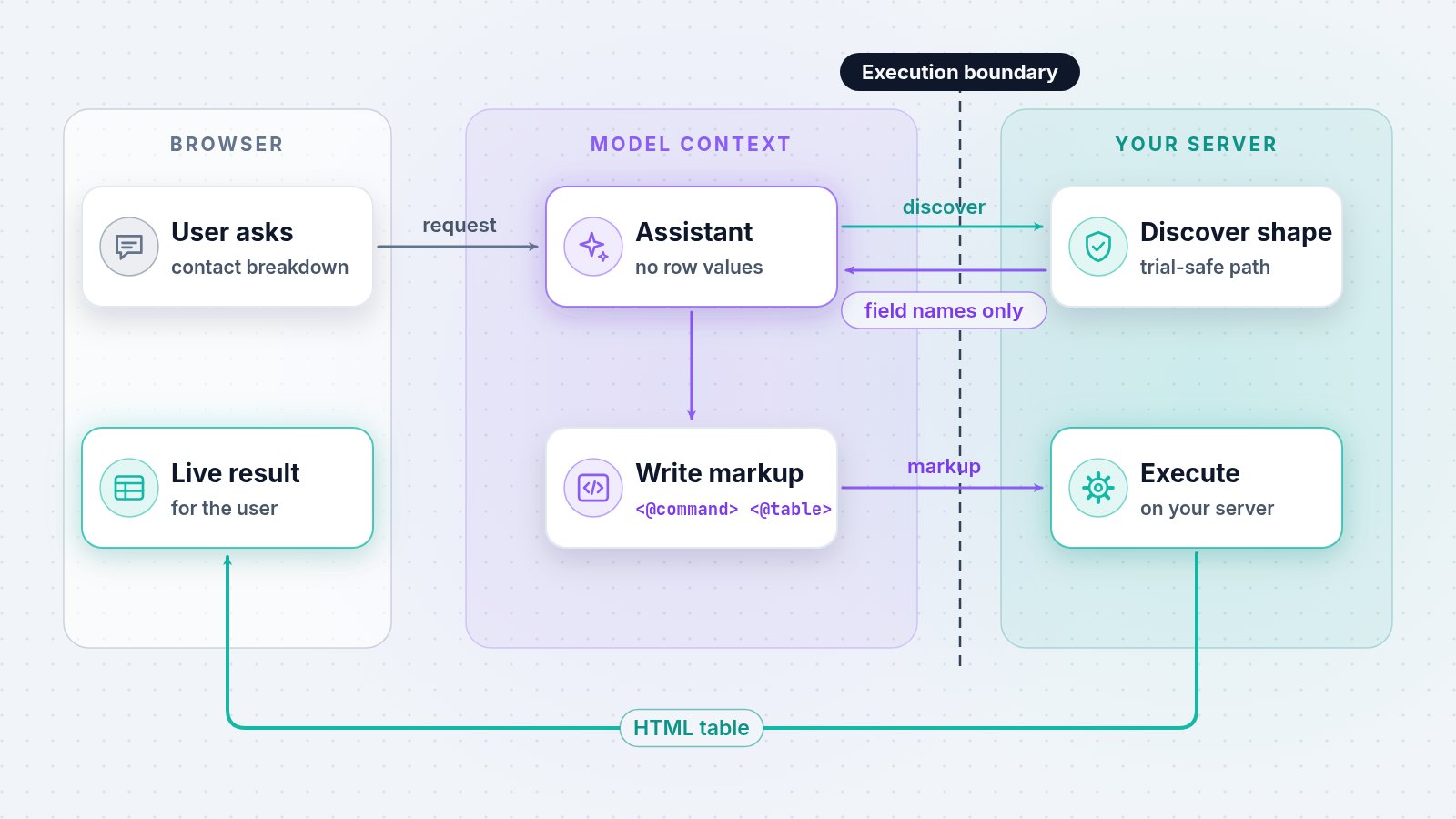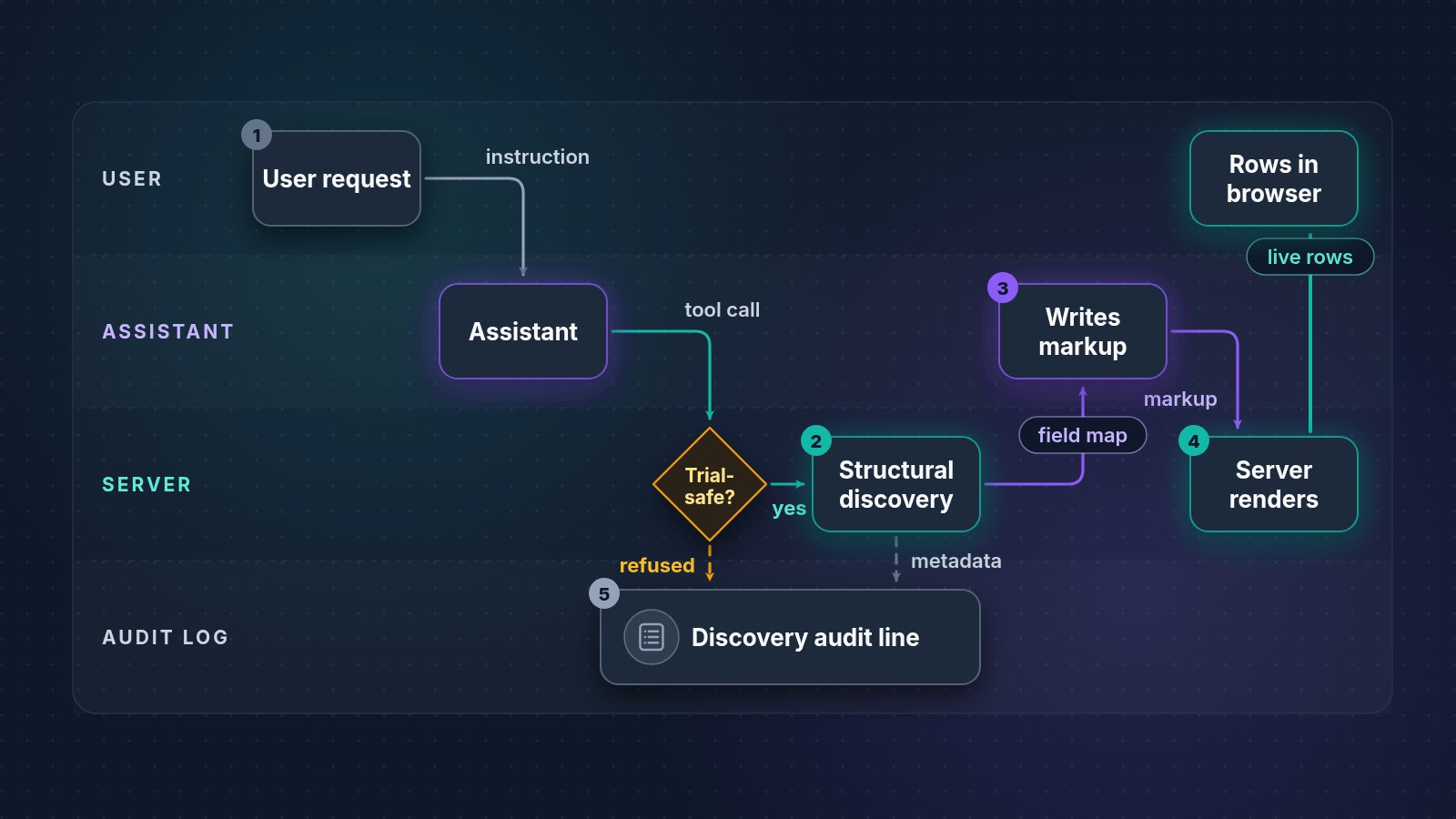
WebEdify, MACRIM's .NET application platform, handles one representative request this way: the assistant receives the user's instruction and a structural description of the selected command result; it writes table markup; and the server renders the live rows for the user. The built-in discovery tool logs command metadata rather than returned rows, while a later scoped data request has its own access-metadata line. The sanitized walkthrough below separates each event so a reviewer can see what crosses each boundary.
What happens when the user submits the request?
The representative user types: Show me the open appointments as a table. The assistant receives that instruction, the conversation context, and the tools exposed for the current workspace. The prompt itself contains no appointment rows.
At this point, the application has not sent a command result to the model. The assistant knows the requested outcome but still needs the result shape before it can choose reliable columns.
What happens when structural discovery runs?
The assistant calls the trial-safe discovery tool for the appointment-search command. WebEdify executes the command server-side and applies a serialize-only transform that walks the result tree. The model receives a description such as:
results ($) [children]
  appointment [appointment_date, provider_name, status]
The child count and field names are illustrative; values are omitted from this sanitized trace. The command still incurs its normal server-side execution cost. If the command contains processors that are not classified for trial execution, discovery is refused and the audit line identifies the command and flagged processor names.
What does the assistant write after discovery?
Using the returned shape, the assistant can produce markup without inventing field names:
<@command name="search" group="models/appointment" rename="rows" />
<@table source="rows">
  <@column prop="appointment_date" title="Date" />
  <@column prop="provider_name" title="Provider" />
  <@column prop="status" title="Status" />
</@table>
The language model sees the markup it authored. It still does not need the appointment values to choose these columns.
What reaches the user's browser?
The assistant sends the markup to WebEdify's rendering tool. The server executes the command, renders the table, and sends the workspace output to the user's browser. The user sees the appointment rows their application allows the command to return; the assistant's structural-discovery result remains a field map rather than a copy of those rows.
What gets logged on that one request?
"Logged" here means the built-in discovery and data-request information-level audit lines, not every log an application, custom processor, data provider, or model provider may produce. For the appointment example, the discovery event records:
- Tool operation and outcome
- Command name, group, and segment
- Refusal details when a processor is not trial-safe
Those built-in information lines do not include the returned appointment rows. Conversations, messages, and workspace artifacts are persisted to the configured AI store so sessions survive refresh; that persistence is a separate data surface from the tool audit lines.
If the user later asks the model to reason over actual values, WebEdify uses a separate, scoped data-request path. Its audit line includes the command, group, access tier, requested field names, and row limit rather than the returned body. The canonical AI data-access answer explains when that path requires consent or a developer grant.
The useful audit boundary is inspectable behavior per event: the organization can correlate the user's request, structural discovery, generated markup, rendering, and any later data request. Tenant commands, custom processors, telemetry configuration, persisted conversations, and provider-level request archives remain separate parts of the organization's logging and model-provider governance.
What should a security team verify before enabling the assistant?
Bring these questions to your review — and to any vendor:
- Default path: Does a "show me data" flow send values to the model without a separate tool call and consent?
- Per-tool enforcement: Is privacy one setting or tool-by-tool behavior?
- Render boundary: Can the user see data the model never received on the same turn?
- Consent granularity: Is approval per request or per session blanket?
- Logs: Which audit lines contain access metadata, and what application or provider logs must be reviewed separately?
For this walkthrough, the evidence is the sequence itself: inspect the discovery payload, the generated markup, the rendered workspace result, and the available discovery or scoped-data-request audit line. The broader data-access and security posture remains canonical on Why WebEdify.
If you are evaluating the assistant against regulated data, start with one logged turn in your own environment: run a list command, inspect the structural output, review the generated markup, compare it with the rendered workspace, and inspect each configured logging surface.
Read the full data-access explanation at webedify.com/why#ai-data-access, then request a pilot if you want the same exercise on your data model.