Features.
And why each one is hard to copy.
Plenty of platforms can list these as bullet points. What follows is how each one actually works, because that is the part that determines whether it survives contact with your requirements.
1. Velocity with no ceiling
Markdown commands and HTML templates are not a wrapper around generated code — they are what executes. A feature goes from description to running in hours. When configuration genuinely cannot express something, you drop into C# in the same project, with real debugging and real tooling.
## list-patients
**list** patients from default
- maxrows: 50
2. AI that never sees your data
Four explicit tiers of data access, defaulting to the conservative one. The assistant receives structure — field names, hierarchy, counts — and never values. It writes markup, your server executes it, and the result goes straight to the user's browser.
results ($) [15 children]
  contact [id, name, email,
taxid, dob, status]3. An AI workspace, not a chatbot
The assistant does not answer questions about your product — it builds in it. It reads and writes real command and template files under a plan, confirm, then write discipline, with role-scoped personas so a clinician and a developer get different capabilities from the same system.
4. Dashboards your users build themselves
Users arrange their own dashboards from a widget library, saved per person and surviving login. A console component drives an entire grid of widgets from one filter set, so a role gets one coherent view rather than twelve charts that disagree with each other. The analyst who wants it by month instead of by quarter stops filing a ticket to get it.
5. Extend it, never fork it
New tags, pipeline processors, data providers, AI channels, and AI tools are each a single interface. Reference your assembly and the platform discovers it at startup. Your extensions live in your libraries on your versioning, so upgrades do not collide with your customisations.
**eligibility** check with payer
- plan: ``
- retries: 2
6. Change production safely, now
File resolution is version-aware. A developer edits their own isolated version and previews it in the live environment against real data. Production users see the current version until someone promotes the change. Urgent fixes stop requiring a deployment window.
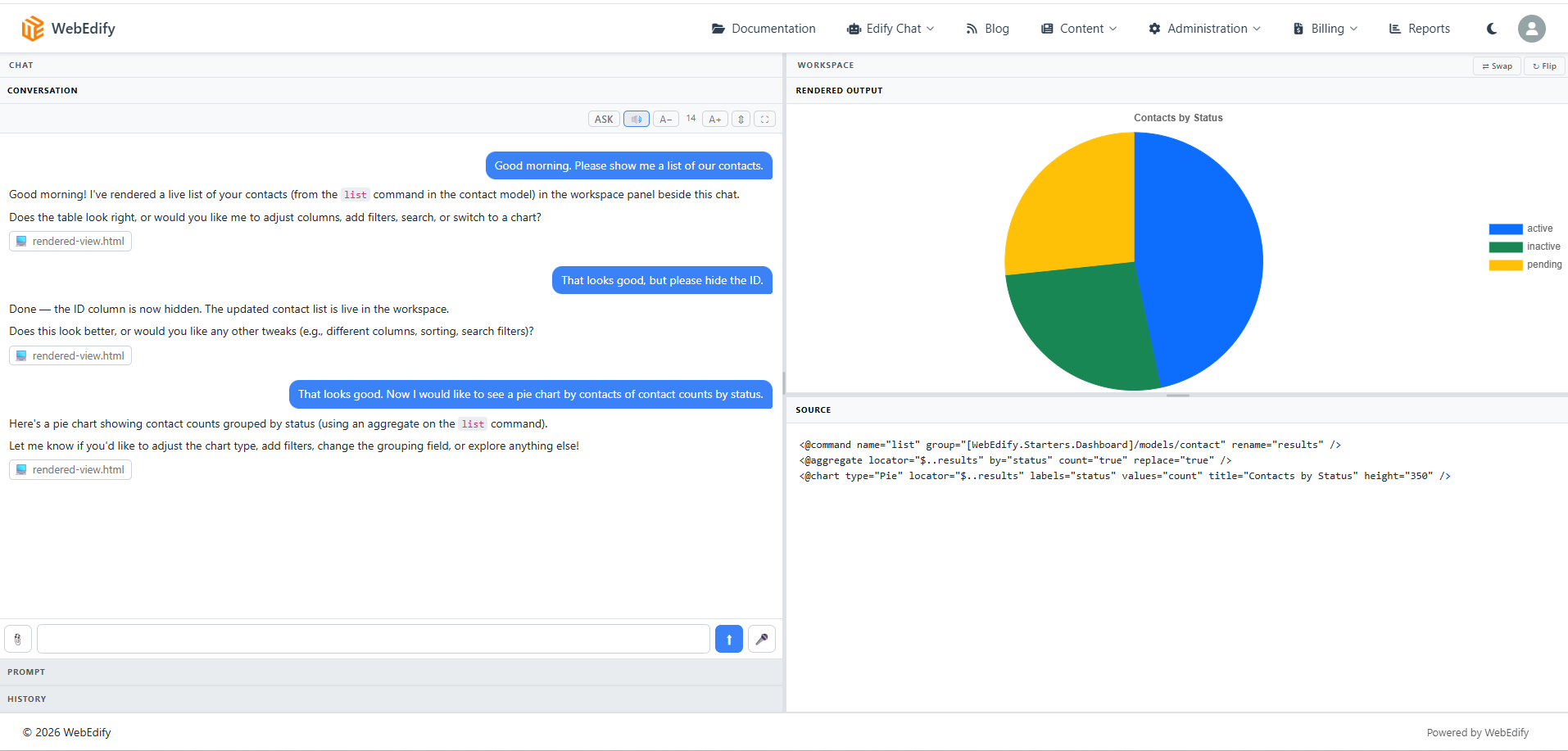
What the third one actually looks like
The workspace is itself declarative — <@ide> with panels and spaces. The
conversation sits on one side and what the assistant builds renders on the other. Because it
authors markup rather than answers, you can read exactly what produced the result.
Underneath all of it
Standard .NET, running against Cosmos DB, SQL Server, Snowflake and SQLite as first-class data providers, with REST services reachable from the same commands, hosted on Azure. Commands, templates, and extensions are plain files in Git — so version control, code review, and CI work exactly the way your team already works. There is no proprietary designer holding your application inside a database.
resource/commands/models/patient.md
templates/dashboard.html
wwwroot/css/site.css
Already in the box
The six above are architecture. These three are ordinary things most platforms either sell separately or expect you to bolt on afterwards.
Multi-tenancy
If what you are building serves your own customers, tenancy is already a default
database construct. segment:catalog is the default primary key format, so
the tenant is half the composite key on a SQL table and the partition key path on a
Cosmos container.
Configuration resolves per tenant too, so one tenant can share a database and another can sit in its own. Nobody hand-rolls a discriminator column and hopes every query remembers it.
How tenancy worksContent management
Articles and media with a full authoring surface, a media library, draft and publish states, and category and tag taxonomy. Every article carries its own title and description, so changing a page title is not a support ticket.
The part that matters is where it lives: the same application as your data, dashboards and transactions, rather than a separate CMS with a login of its own and an integration between them.
Payments, invoicing and donations
Invoices, pledges, receipts and donations as first-class records, over a full ledger with refunds, voids and corrections. Cards are vaulted at the gateway and charged against a stored profile.
Authorize.Net ships in the box. The gateway sits behind one contract, so adding or changing a processor is a package and a configuration change rather than a re-integration.
How the billing engine worksAll things done for edification.
Every one of these exists to build up the team using it — so that the people closest to the work stop waiting on someone else to change their software.
Published monthly ranges: hosting $300–350, automation $600–900, analytics $1,250–2,500. What it costs.