WebEdify, MACRIM's .NET application platform, is intentionally server-first: HTML is rendered on the server from declarative templates and markdown commands, then enhanced by a small embedded JavaScript layer for tables, forms, dialogs, charts, and live relays. We did not build a client router, a component tree, or a bundler pipeline — not because interactivity is unimportant, but because our target applications are data-driven business systems where the winning tradeoff is plain files in Git, pages that search engines and LLMs can read, and a stack where business analysts and AI assistants work in the same markup developers deploy.
What does server-first mean in practice?
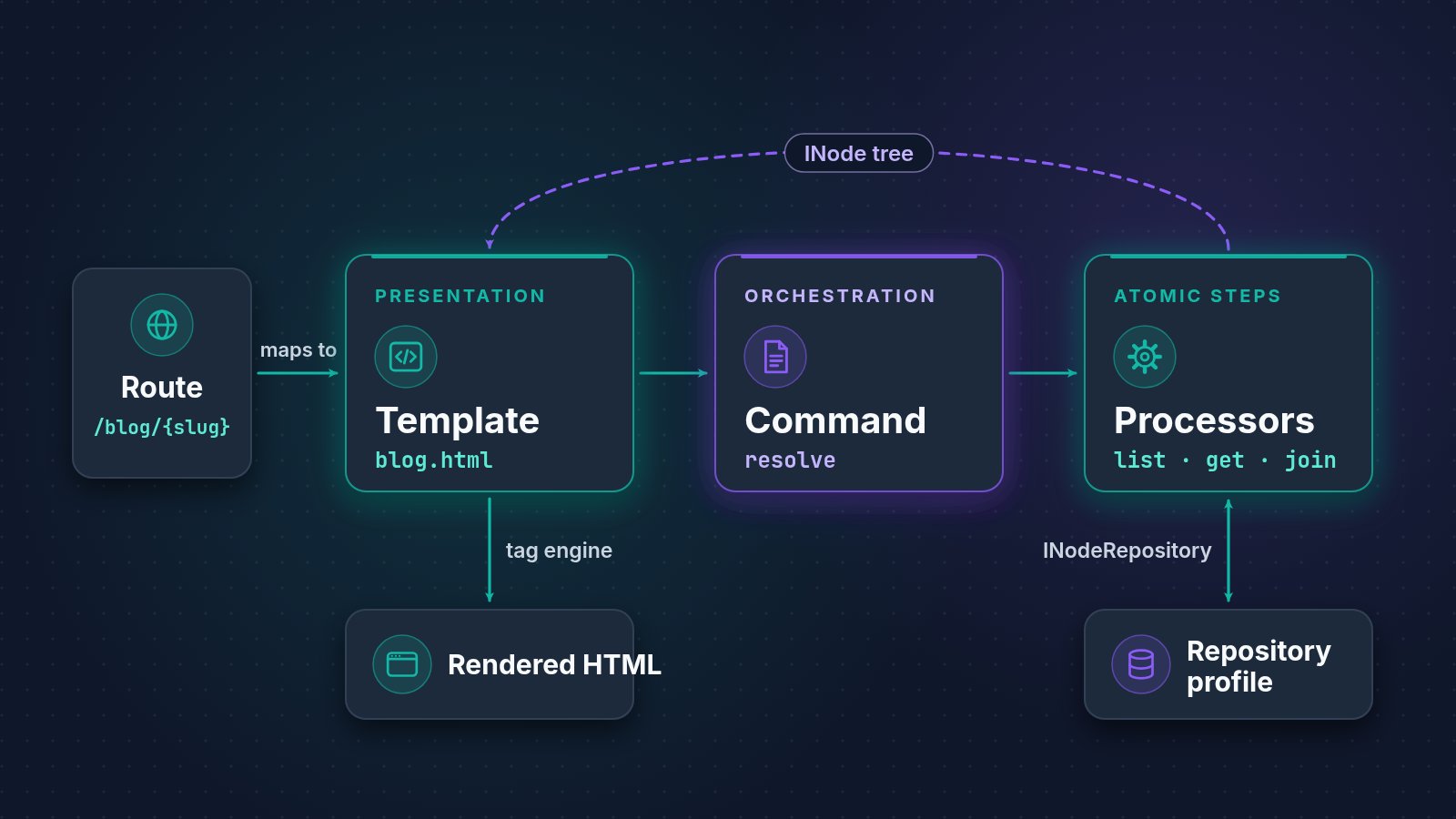
A WebEdify page is an HTML template. Tags at the top load data — <@command>, <@relay>, <@auth> — and tags in the body render it — <@table>, <@form>, <@chart>, <@each>. The ASP.NET Core host executes commands, resolves , runs the two-pass tag pipeline, and sends complete HTML to the browser. Routes map to template filenames: patients.html can serve /patients.
After first paint, embedded webedify.js hydrates interactive regions. A server-paged table fetches its next page via AJAX. A form posts JSON to a command endpoint and binds validation errors back to fields. A dialog opens from a table row click without a page reload. A chart refreshes when an external date-range filter changes. This is real interactivity — it simply does not require React, Vue, Angular, or a node_modules folder.
The marketing site, Medhelp's clinical dashboards, PAG's invoice administration, and the platform's own admin CMS all run this way today.
What did a SPA architecture offer — and what did we keep instead?
Single-page applications excel when the product is the interface — infinite scroll, sub-millisecond client transitions, offline-first mobile experiences, a component library as the brand. WebEdify's sweet spot is different: internal tools, customer portals, healthcare dashboards, benefits administration, donation flows — applications where data integrity, auditability, and time-to-first-screen matter more than client-side route animations.
| SPA typical stack | WebEdify server-first equivalent |
|---|---|
| Client router + page components | Template files + server routing |
| REST calls wired in frontend services | <@command defer="true"> inside <@table>, <@form action="..."> |
| State management library | Server INode context + cache levels |
| npm, webpack, TypeScript build | Save template, refresh browser |
| Component library version upgrades | Platform-owned webedify.js |
We kept the integration tight on purpose. Forms submit to commands. Tables load from commands. Dialogs link to forms that save through commands and refresh tables. Charts read from the same caches filters update. The client JavaScript is not a generic UI kit — it is built to complement the command-driven server architecture and eliminate the glue code that typically sits between a React front end and a .NET API.
How does this help SEO, sharing, and AI-assisted development?
Server-rendered HTML arrives with content in the document. Marketing pages, public CMS articles, and authenticated dashboards all share the same rendering path — the auth gate decides what data loads, not whether the page exists as HTML.
That matters twice for modern discovery. Search engines index what the server sends. LLM-assisted development works better when the source of truth is declarative markup and markdown commands a model can read and emit reliably — not a component hierarchy spread across forty TypeScript files with implicit prop drilling.
WebEdify's AI assistant authors the same <@table> and <@command> files a developer would write. Because the syntax is explicit and bounded, generated features land in reviewable plain text — not opaque compiled bundles.
Does server-first mean no JavaScript?
No. It means no JavaScript framework dependency and no build step for your application code.
Your templates may include <@script> blocks for page-specific callbacks — a table refresh after save, a custom column renderer, a filter handler. The platform ships formatted controls, validation, AJAX helpers, dialog and toast utilities, and the full table engine. Medhelp dashboard widgets use client-side column functions for drill links. PAG invoice administration wires autocomplete and inline-edit callbacks. The marketing site's pilot-requests screen posts status updates through edify.ajax.
For ordinary application screens, you avoid an application-owned package.json, npm dependency tree, hydration layer, and JavaScript-framework major-version program. WebEdify's .NET packages, embedded client assets, and any third-party libraries a specialized screen deliberately adds still follow normal maintenance. Nothing to build, nothing to upgrade is the user-facing summary of removing the application-level frontend build pipeline, not a claim that software stops receiving updates.
How does this compare to React or Next.js for our target apps?
React and Next.js are the right choice when the UI is the product differentiation — novel interaction design, massive design-system investment, a frontend engineering team that outnumbers backend two to one. WebEdify targets teams who need a secure .NET backend, tenant-isolated data, CRUD and reporting screens, dashboards, CMS, billing, and an AI layer — delivered in days and extended by analysts as well as developers.
The comparison on why WebEdify is deliberately fair: bespoke React delivered by an agency makes sense when the interface is the moat. WebEdify makes sense when you want most of that flexibility without funding scaffolding — auth, multi-tenancy, tables, charts, dashboards, AI — from scratch, and without inheriting a build pipeline afterward.
Next.js hybrid rendering bridges some SEO gaps for SPAs; WebEdify does not need the bridge because SSR is the default path, not an opt-in mode.
How does WebEdify keep a path open for specialized client experiences?
A highly specialized screen — a canvas editor, real-time collaborative workspace, or WebGL visualization — can load a standalone client bundle from a WebEdify template while the rest of the application remains server-first. The platform keeps that integration at the edge: WebEdify still provides routing, identity, commands, data access, and the surrounding application.
For operational screens, a server round-trip on save is intentional because the command pipeline validates, persists, and audits before the UI confirms success. Specialized interaction code stays focused on the screen that needs it instead of becoming the architecture every form and report must inherit.
What about partial updates without becoming a SPA?
<@load> lazy-loads a template fragment after first paint via fetch — useful for tabs, secondary panels, or infrequently opened admin sections without adopting client-side routing. Relay endpoints and table AJAX loads already deliver partial data refresh. The architecture supports incremental network use without converting the entire application to a client-rendered shell.
How can you compare server-first with a SPA?
Open design strategies and preview eight working layout architectures — server-rendered, interactive, zero npm install. Read how it works for the four-step path from environment to running screens. If your team is weighing SPA versus server-first for a .NET business application, talk to us with your requirement — we will show the same pattern running against your data in a dedicated environment, usually within the first week.