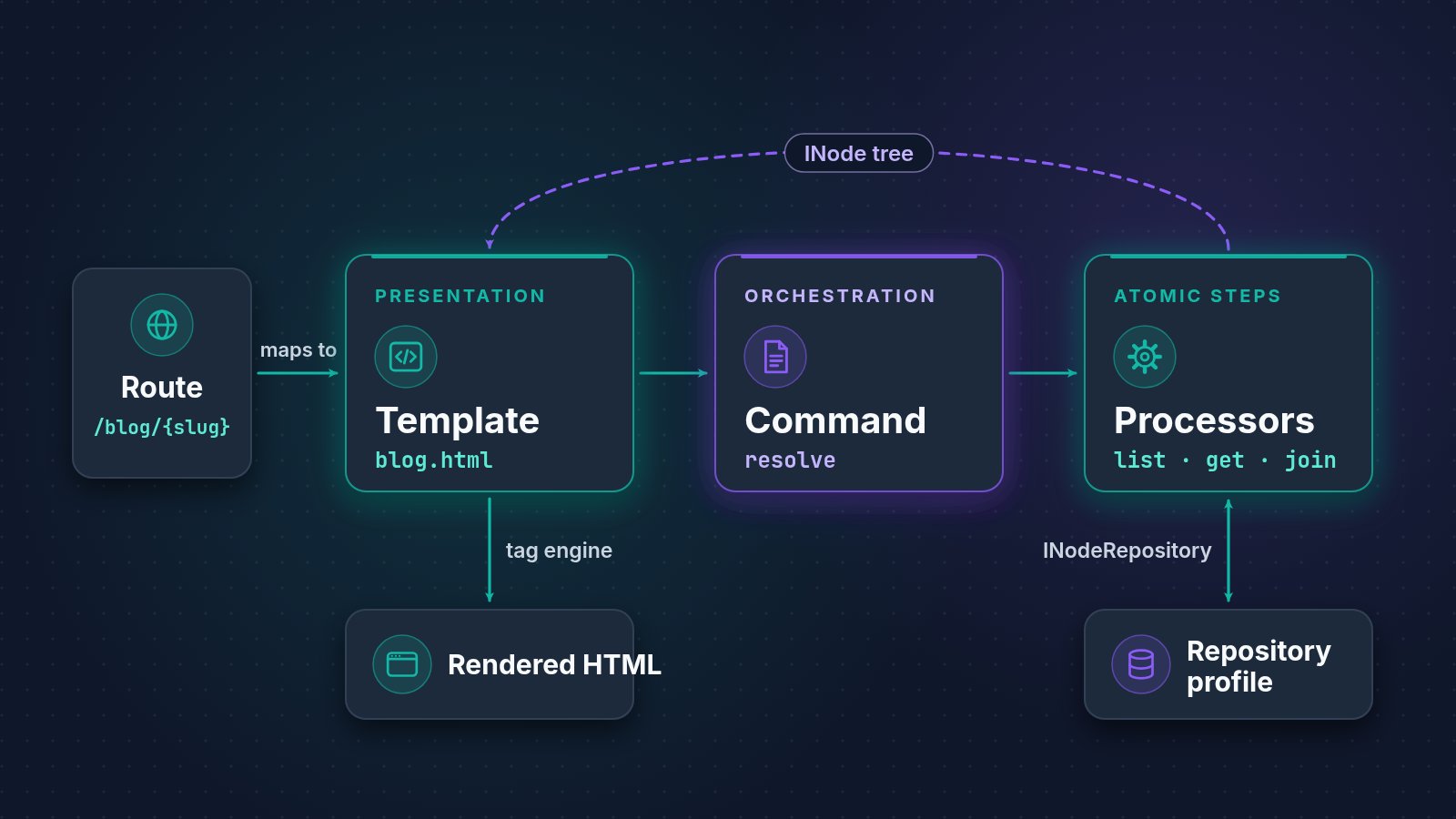
WebEdify, MACRIM's .NET application platform, supports two versioning implementations for teams working on the same application. Platform.Database stores commands, files, and configuration on a shared version axis and publishes by moving a cutoff pointer. Platform.Git gives non-production work sparse branch overlays over deployed files, reports Git conflicts explicitly, and promotes by applying an overlay to production disk. Both let developers preview command and template changes without exposing them to production users, but their storage and promotion mechanics are deliberately different.
How do Platform.Database version lanes work?
With WebEdify.Platform.Database, a command, template, or configuration value is addressed by three coordinates: segment, version, and path. Versions are points on a single lex-sortable axis (YY.MM.DD release cadence), not separate containers.
Three pointers sit on that axis:
| Pointer | Role |
|---|---|
Prod (Config.Version) |
The published cutoff. Reads ignore versions above it. Writes at this coordinate are rejected. |
Staging (StagingVersion) |
The next promotion candidate. Writable when selected. |
User (ActiveVersion) |
The caller's working coordinate — typically at or above staging. |
When a developer sets User.ActiveVersion to 01.09.15, every Database-platform read resolves to the highest-versioned row for each artifact whose version is less than or equal to 01.09.15. Production requests, where Context.Version equals Config.Version, never see rows stamped above the prod cutoff. The developer can preview 01.09.15 against the same configured data connections while production users continue reading 01.09.01.
That preview can happen in the running application without copying rows between staging and production containers. Deployments may still use more than one host; the version contract is the same on each host.
How do Database-platform reads and writes behave?
Read resolution is one query per artifact per request: highest version less than or equal to Context.Version, preferring the active segment over the wildcard * segment. Sparse overrides are free — saving a single command at 01.09.15 overrides only that command; everything else continues resolving to its prior version.
Writes stamp exactly one version: Context.Version. If that equals Config.Version, the write is rejected — prod is read-only. No admin flag overrides this. Urgent production fixes use a release-tier version bump: stamp the fix at 01.09.02 when prod is 01.09.01, then advance the prod pointer to 01.09.02. Only that artifact changes for prod users; nothing else tagged only at staging comes along.
This is the Database-platform mechanism behind changing production safely — not magic hot reload, but a deliberate version axis with a pointer bump.
Can two developers edit the same file at once?
Yes, and the outcome depends on which layer they share.
On the database version store: Two developers saving the same command at the same version coordinate follow the underlying store's upsert semantics — effectively last-writer-wins for that (path, segment, version) tuple. The platform does not auto-merge their edits. Teams coordinate through version assignment (each developer works at a different ActiveVersion) or through review before both target the same coordinate.
On the Git overlay platform: When WebEdify.Platform.Git is registered, non-production version lanes map to Git branches with sparse copy-on-write overlays. Short-cycle writes pull, surgically merge one command section into a group markdown file, commit, and optionally push. If two writers conflict, the platform reports a hard Git conflict that the developer or AI assistant must resolve. There are no silent auto-retries that conceal the collision.
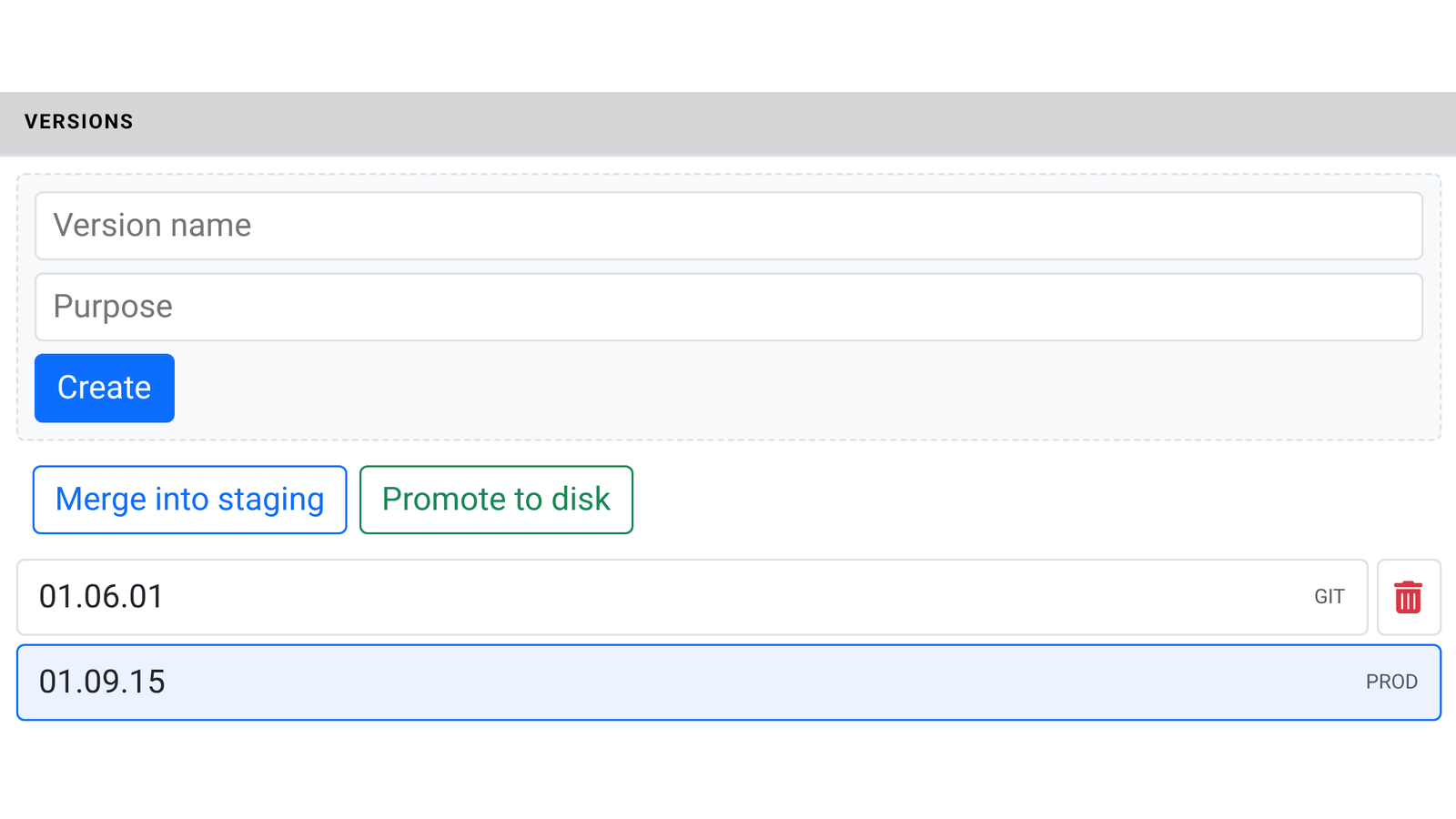
Merge into staging is an explicit operation — in-app merge of a feature overlay into the staging branch, or an Azure DevOps pull request onto staging if your team prefers review there. Promotion snapshots current production disk, applies overlay writes and tombstones, and production visitors read the updated files. Bumping Config.Version remains a separate, deliberate step.
How do Platform.Git lanes work?
Production on a Git-enabled host reads the normal deployed files from disk (plus embedded fallbacks). Git branches are consulted only when a user has set ActiveVersion to a non-production lane. That means production traffic never depends on Git availability, and developers opt into overlay lanes when they need isolated preview.
A sparse overlay starts from a minimal internal base rather than copying the full deployed tree into every branch. It contains only changed files plus deletion markers for content the lane intentionally hides. Reads use overlay content where it exists and fall back to deployed files elsewhere; a deletion marker prevents that fallback until promotion applies the change.
Human developers and the AI assistant work in the same command and template files under the same branch rules. When both change the same command section, Git conflict detection surfaces the collision just as it would between two human contributors.
What about the AI assistant in the same codebase?
The AI workspace uses the versioning implementation registered by the application and the same active lane selected for the user. Write tools refuse to operate at the production version, returning a clear message to select a writable lane first. On Platform.Git, command writes use single-section surgical merges into group markdown files rather than rewriting entire files — reducing blast radius when two agents or a human and an agent touch adjacent sections.
An analyst describing a new dashboard view gets markup the developer can read, edit, and commit. Changes land in the analyst's version lane first; production users see nothing until someone promotes. That is step four of how an engagement works — your team stops waiting on vendor deploy cycles for every screen change.
How is this different from Git branch plus CI deploy?
Traditional flow: branch, commit, PR, merge, pipeline builds, deploy to staging, test, deploy to prod. WebEdify compresses the preview step — a developer selects a version lane and refreshes the browser against the application's configured data. No application build step sits between editing a template and seeing it run. Platform.Database promotes with a pointer bump; Platform.Git snapshots production disk and applies the promoted overlay, with the Config.Version update handled separately.
CI and Git remain valuable for review, audit, and backup. WebEdify does not replace them — it removes the mandatory deploy between "I changed a command" and "I can click through the result." Teams still tag releases, still run tests, still open pull requests when they want human review before staging merge.
What permissions gate the dangerous operations?
Setting User.ActiveVersion is permission-gated. Promoting a version, merging overlays, deleting version branches, and reverting overlay files each require explicit capabilities. Platform.Database rejects writes at Config.Version; Platform.Git keeps production on deployed disk and accepts short-cycle writes only on non-production branches.
The Change Manager UI (version list, select, create, merge, promote) exposes these operations to authorized users without requiring command-line Git fluency from every analyst on the team.
How can your team test version lanes?
If your team is evaluating whether WebEdify fits a multi-developer roadmap, the question to ask in a pilot is practical: can two people change different screens in the same week without a deploy calendar entry? Assign each developer a Database coordinate or Git overlay branch and watch production stay untouched until the matching promotion flow is completed.
Read the architecture behind safe production changes for the buyer-level story, then talk to us about standing up an environment where your team can prove the workflow against your own commands and data.